What the police clearance certificate is
The Police Clearance Certificate (PCC) is an official document issued to Indian passport holders that certifies their criminal record status. You need it when you apply for residential status abroad, employment, a long-term visa or immigration. It is not issued for travel on a tourist visa. When another country's visa process asks for a police clearance certificate from India as visa support, that counts as a long-term visa purpose and qualifies. Foreign nationals who live in the country can also request a certificate, usually through their own embassy or consulate, with documents and steps that differ from those for citizens.
India PCC photo size explained
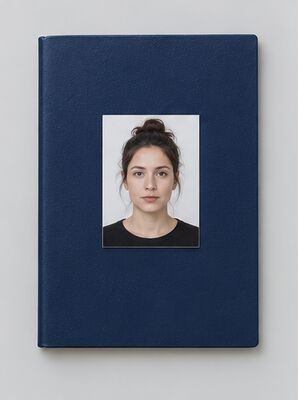
The Passport Seva portal accepts a digital photo of exactly 630×810 pixels, in colour, on a white background, with a maximum file size of 250 KB. The face should cover 80–85% of the frame, with the full head from crown to chin visible, centred and not tilted. In our template the head is about 540 pixels tall and the top of the hair sits about 55 pixels below the upper edge. The pixel size and the file size are two separate checks: a correctly cropped photo can still fail if the file is larger than 250 KB, and a small file fails if it is 629×810 or any other size.
Why the portal rejects a photo
The portal validates every upload before any officer sees it. The two error messages applicants meet most often are "Image Size is not correct. Dimensions should be 630×810 pixels" and "Photo is not valid as per ICAO standards". Both block the PCC application entirely, so you cannot submit the form until the file is fixed. The ICAO check catches a face that is too small in the frame, a coloured or grey background, an unusual head angle, closed eyes and similar problems.
Official rules for the face and the light
The ICAO guidelines published by the High Commission of India in Kuala Lumpur list what a valid photo looks like:
- Eyes open and clearly visible, with no hair across them.
- A natural expression with the mouth closed.
- Head centred and level, looking straight at the camera.
- Uniform lighting: no shadows, no flash reflections, no red-eye.
- Glasses removed, including thin and frameless ones.
- A sharp photo that is not blurred.
- No alterations by computer software, such as skin smoothing or eye brightening.
The guidelines recommend a camera distance of about 1.5 metres. At that distance the head and the top of the shoulders fit the frame naturally, without the wide-angle distortion a phone gives up close.
Head coverings and glasses
Head coverings are not permitted except for religious reasons. When a religious covering is worn, the face from the bottom of the chin to the top of the forehead and both edges of the face must be clearly shown. A covering that hides the forehead, the cheeks or the jawline fails the ICAO check. There is no glasses exemption for the police clearance certificate: remove all eyewear before the shot, because even thin lenses can produce glare that the portal flags.
How to apply for a PCC in India
Residents of India fill in the PCC application on the Passport Seva portal, upload the photo and then visit a Passport Seva Kendra (PSK) or Mini PSK within the jurisdiction of their Passport Office. According to the PCC application form instructions, you bring:
- Your original passport.
- A self-attested copy of the first two and last two pages, including the ECR/Non-ECR page and any observation pages.
- Proof of present address if it differs from the address in the passport.
The fee at a PSK or Mini PSK is Rs. 500, payable in cash only. If the existing police verification report is clear, the police clearance certificate is issued the same day. If your present address differs from the one in the passport, fresh police verification is needed first; the Passport Office then informs you by email or letter, and you bring your passport to collect the certificate. The country for which the PCC is issued is stamped on your passport. Incorrect or suppressed information on the form leads to rejection and may attract penalties under the Passports Act, 1967.
Applying from abroad
Indian nationals overseas start the application on the mportal.passportindia.gov.in website and then submit documents in person or by courier to the nearest Indian mission. Issuance has no fixed timeframe, because it depends on clearance from the police in India, and there is no emergency service, so apply well in advance. Examples from mission websites:
- HCI Wellington: 5–6 weeks after a complete application, fee NZD 45. Residents of Northland, Auckland and Waikato apply through CGI Auckland.
- Embassy of India in Buenos Aires: 6–8 weeks, with no guarantee of issuance in that time.
- CGI Atlanta: 5–7 working days from receipt of a complete postal application, USD 45 plus USD 2 ICWF.
- CGI Houston: USD 25 for passports issued in Houston, USD 40 for passports issued by other missions, plus ICWF and outsourcing charges.
- CGI San Francisco: since 1 August 2025 the service goes through a third-party channel.
When you also need a printed picture
The digital upload is always 630×810 pixels. Some missions also ask for a print in the paper package: HCI Kuala Lumpur asks Indian nationals who apply in person for one recent printed photograph of 5×5 cm with a white background, and foreign nationals for two. Check your mission's page before you print.
Goa and West Bengal state portals
The Goa Police portal serves persons of Indian origin who have lived in Goa for more than one year. Its rules differ from the national standard: 600×600 pixels, colour, JPEG/JPG/PNG/BMP, up to 500 KB and about 70% clear face visibility. It charges Rs. 200 and processes requests within 5 working days. Do not use a Goa file for a Passport Seva application, or the reverse: the two formats are incompatible. West Bengal runs its own portal at pcc.wb.gov.in; applicants there without an Aadhaar card apply through their local Police Station or Police District Office.
Workers going to ECR countries
Workers who need the certificate for one of the 17 Emigration Check Required countries listed in the Hyderabad Passport Office instructions, including the UAE, Saudi Arabia, Qatar, Oman, Kuwait, Bahrain and Malaysia, add employment documents. Skilled and semi-skilled workers include a self-attested copy of the employment contract; unskilled workers and women provide a contract attested by the Indian Mission or a permission letter from it. Dependent family members provide a sponsorship declaration. The Ministry of External Affairs updates the ECR list, so verify it on passportindia.gov.in before you apply.
Taking the photo with a phone
A smartphone photo can meet the requirements if the conditions are right. Stand facing a large window so daylight falls evenly on your face; light from behind or from one side leaves shadows that fail the uniform-lighting check. A plain wall behind you is enough, because our AI sets a white background. If you can, ask someone else to hold the phone about 1.5 metres away: a photo taken at arm's length rarely keeps the head centred. Keep your head level, look directly into the lens, close your mouth and keep a natural expression. Hold the phone still, ideally steadied against a shelf or a door frame, when you press the shutter, and switch off the flash. Before you upload, confirm that both eyes are fully open, no hair falls across them and the photo is sharp throughout.
Preparing the photo file yourself
If you crop the photo in an editor, resize it to exactly 630 pixels wide and 810 pixels high and keep it in colour. Then check the file size: if it is above 250 KB, save it again with stronger compression rather than changing the pixel dimensions. Do not smooth the skin or brighten the eyes, since the official guidelines reject photos altered by computer software. Our maker does the crop and the compression for you, and the AI compliance check is free, so you can see whether the photo passes before you download it.
Checklist before you submit
- Photo size of exactly 630×810 pixels.
- File size of 250 KB or less.
- Plain white background with no shadows.
- Face covering 80–85% of the photo, full head from crown to chin.
- Eyes open, mouth closed, no glasses, no hair across the eyes.
- Sharp colour photo with no filters or retouching.
Photos for other documents
Each Indian document has its own photo rules, so check its page before you reuse this file: India passport, India visa, PAN card and Voter ID card.